DSAR-Need Additional Information and Preprocessing
Whenever additional information is required to process the user's request, the 'Flow' tab provides different options to configure this stage.
Click on the 'Next' button on the In Validation configuration to navigate to the 'Need Additional Information' section.
You can also reach this configuration by clicking on the 'Need Additional Information' button.

If you want to automate the 'Need Additional Information stage,
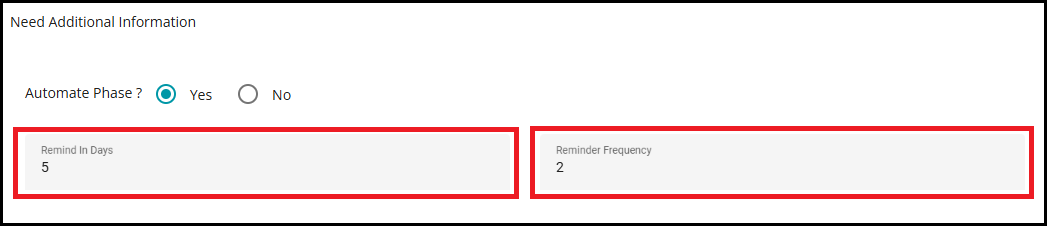
- Mark the Automate Phase? as Yes.

The automations in this stage are --
a. The system sends reminder emails asking for additional information based on the configured reminder frequency.
b. The requests are marked as closed if the additional information isn't received within the due date as configured in the flow.
Pre-processing is a flexible step in the DSAR flow setup that enables you to carry out supplementary tasks before the main request handling begins. This stage is particularly valuable when related activities need to be executed alongside the primary request to maintain compliance or boost operational effectiveness.
Note: The pre-process stage can also be automated in a request flow; however, the process phase of the flow mapped to the pre-process stage should also be automated if you want to complete the stage automatically. If that flow isn't automated, the system waits until the pre-process stage is completed manually and then continues with the remaining stages.
You can continue to define the following configurations, irrespective of automating this stage.
Remind in Days: used to specify the number of days after which the reminder email should be rolled out.
- For example, if you set Remind in Days to 5, the first reminder will be sent on the 5th day after the request is submitted.
Reminder Frequency: used to specify the number of times the reminder email should be sent to the customer/user for verification.
For example, if Reminder Frequency is set to 2, the system will send two reminders:
The first reminder on the 5th day
The second reminder on the 10th day (5 days after the first reminder)
Close Request If Not Responded -- In case of no response from the users for additional information, this option can be used to close the request and inform the users.
The Verification template for "Need Additional Information" cannot be selected directly in this section. Instead, you must configure it in the Acknowledgement section. In Acknowledgement, under the "Need Additional Information" section, whatever you select for the Close Request template will be displayed here.
For more details on configuring these templates, please refer toDSAR-Acknowledge.docx.
Click the 'Close Request in Days' option.
Specify the number of days to close the request.

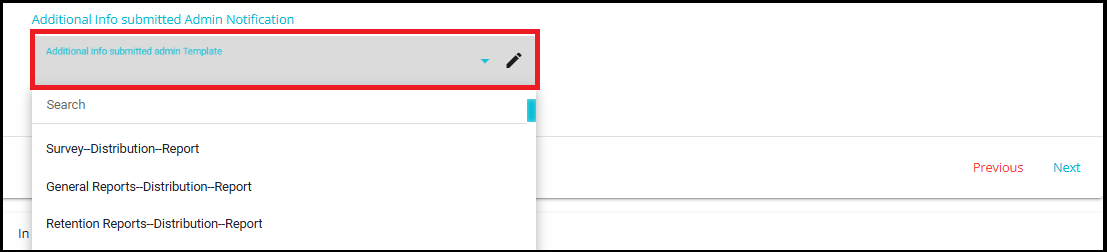
Additional Info Submitted Admin Notification -- This drop-down menu is used to configure the template for sending notifications through the process.
- Click on the 'Select Template' drop-down menu and select the required template from the menu.
Note: Alert notifications are sent to the admins whenever there is an update related to additional information requirements.
To configure the email template, click on the pencil icon next to the template name. This action will navigate you to the Configure Email screen, where you can edit the content of the selected email template. For detailed steps on configuring an email, please refer to configure email.docx.
Pre-Processing
Pre-processing is an optional stage in the DSAR flow configuration that allows you to perform additional actions before the main request is processed. It is useful when certain related tasks need to be completed in parallel to the primary request to ensure compliance or improve efficiency.
How it Works
- When pre-processing is enabled, a new stage called pre-processing appears in the flow.
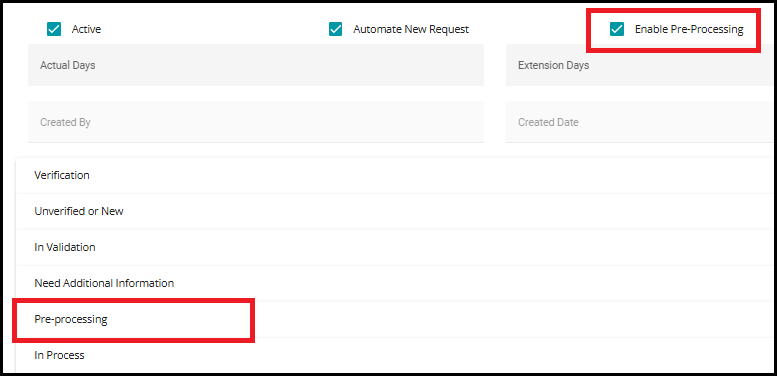
- You can map an existing flow as the pre-processing stage for the current request.

- Action items from the selected flow will run in parallel with the main request process stage, without waiting for the main flow to be completed.
Example
User submits a Delete request to remove their personal data.
At the same time, initiates an Opt-Out process as a pre-processing step.
This ensures the user is opted out from targeted advertising or sale/share of data internally, even before the deletion is finalized.